The campaign leverages judicial document themes to distribute Hijackloader malware, which subsequently deploys PureHVNC remote access trojan (RAT)—marking the first observed instance where this combination has been used against Spanish-speaking users in Latin America. The campaign represents a significant tactical shift for threat actors operating in the region. Hijackloader, previously documented in campaigns targeting CrowdStrike […]
Threat intelligence researchers have identified a new ransomware-as-a-service (RaaS) operation called The Gentlemen’s RaaS, being actively recruited on underground hacking forums by an operator using the handle zeta88. The cross-platform threat represents a significant evolution in ransomware capabilities, offering attackers specialized encryption lockers for Windows, Linux, and ESXi systems coded in both Go and C […]
Google has announced a significant security initiative that will fundamentally change how Chrome handles unsecured web connections.
Beginning with Chrome 154’s release in October 2026, the browser will enable the “Always Use Secure Connections” feature by default, requiring users to approve access to any public website lacking HTTPS encryption before proceeding.
This strategic shift represents a critical advancement in browser security, addressing a persistent vulnerability that attackers continue to exploit.
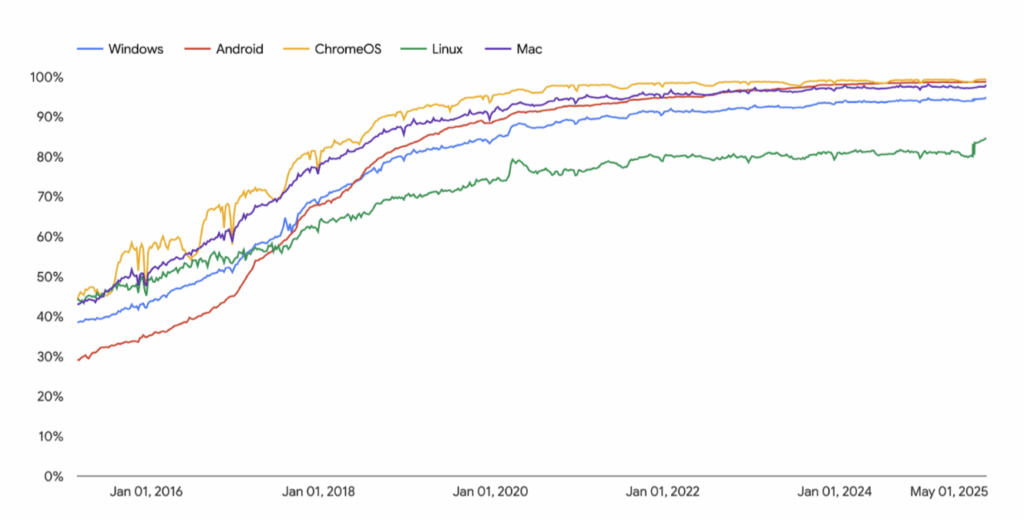
Despite over a decade of progress toward universal HTTPS adoption, approximately 95 to 99 percent of Chrome navigations now use secure connections, leaving a small but significant percentage of traffic exposed to interception and manipulation attacks. The danger of unencrypted HTTP connections extends beyond mere data exposure.
Understanding the Security Threat
Attackers positioned between users and websites, known as man-in-the-middle actors, can hijack HTTP navigations entirely, redirecting users to malicious resources without detection.
This method of attack has proven highly effective in real-world scenarios, with documented cases of commercial surveillance vendors and state-sponsored threat actors using HTTP interception to deliver zero-day exploits and compromise targeted devices.
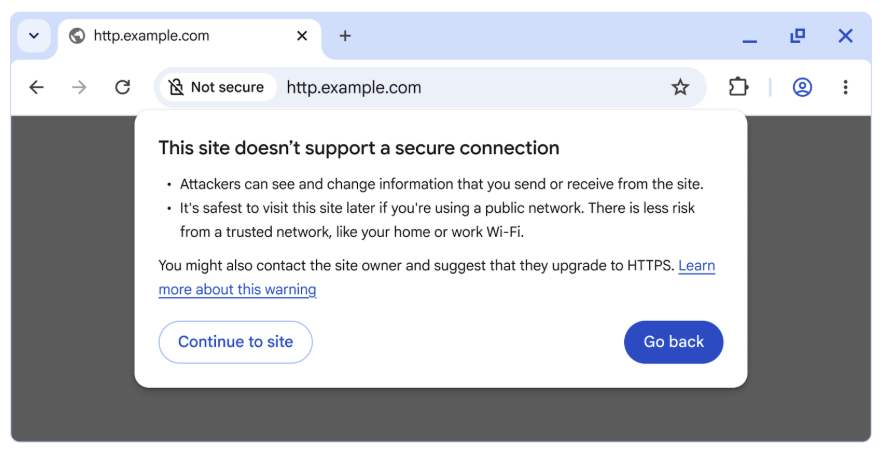
Unlike HTTPS sites that display “Not Secure” warnings, many HTTP sites immediately redirect to HTTPS, rendering the user completely unaware that an attack opportunity existed.
Setting warns users before accessing a site without HTTPS
The Chrome Security team states that any unencrypted navigation, even at a small percentage, poses a potential risk to attackers.
Because these threats are not theoretical but actively exploited through readily available interception tools, the security implications justify aggressive mitigation strategies.
Google’s rollout strategy demonstrates careful consideration of user experience and the complexities of real-world deployment.
In April 2026, Chrome 147 will enable the feature exclusively for the over one billion users who have voluntarily opted into Enhanced Safe Browsing protections.
This initial phase provides a testing environment to validate warning frequency and user behavior before broader deployment.
HTTPS adoption expressed as a percentage of mainframe page loads
Chrome 141 already conducted a pilot program, revealing that the median user encounters fewer than 1 warning per week, with even heavy internet users experiencing fewer than 3 warnings.
This data contradicts assumptions about disruptive notification frequency, providing confidence for full-scale implementation.
A particularly thoughtful aspect of this initiative involves differentiating between public and private sites.
While Google will enforce strict HTTPS requirements for public websites, the implementation acknowledges that private sites, including local network devices and internal corporate systems, present reduced attack surfaces.
When analyzing platform statistics excluding private site traffic, HTTPS adoption rates approach 97 to 99 percent across all systems, indicating that most remaining HTTP usage concentrates on private infrastructure where obtaining trusted HTTPS certificates remains technically complicated.
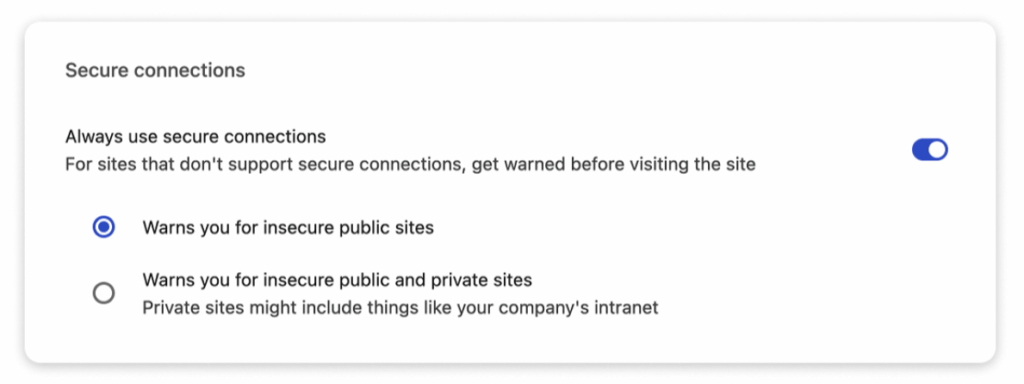
“Always Use Secure Connections,” available at chrome://settings/security
Website developers and IT professionals should immediately enable the “Always Use Secure Connections” setting to identify potentially affected sites.
Organizations managing Chrome deployments can reference Google’s comprehensive adoption guide to understand warning conditions and mitigation strategies.
Many HTTP-using organizations simply haven’t prioritized HTTPS migration, while others depend on HTTP for local network device configuration, a scenario now addressable through Chrome’s new local network access permission system.
Users retain full control, remaining able to disable warnings through settings if necessary, though Google strongly encourages adopting secure connections as standard practice moving forward.
A critical vulnerability discovered in Google Messages for Wear OS has exposed millions of smartwatch users to a significant security risk. Identified as CVE-2025-12080, the flaw allows any installed application to send text messages on behalf of the user without requiring permissions, confirmation, or user interaction. Security researcher Gabriele Digregorio discovered the vulnerability in March […]
Fraudulent investment platforms impersonating legitimate cryptocurrency and forex exchanges have emerged as the primary financial threat across Asia, with organized crime groups operating at unprecedented scale. These sophisticated scams leverage social engineering tactics to deceive victims into transferring funds to attacker-controlled systems, blurring the lines between legitimate trading and criminal enterprise. The threat extends far […]
A threat actor has claimed responsibility for breaching HSBC USA, the American division of the global investment bank and financial services holding company. The cybercriminal posted an extensive database for sale on underground forums, alleging it contains fresh and comprehensive customer data stolen from the financial institution. Massive Collection of Sensitive Customer Data According to […]
BeyondTrust’s annual cybersecurity predictions point to a year where old defenses will fail quietly, and new attack vectors will surge.
Introduction
The next major breach won’t be a phished password. It will be the result of a massive, unmanaged identity debt. This debt takes many forms: it’s the “ghost” identity from a 2015 breach lurking in your IAM, the privilege sprawl from thousands of new
Organizations in Ukraine have been targeted by threat actors of Russian origin with an aim to siphon sensitive data and maintain persistent access to compromised networks.
The activity, according to a new report from the Symantec and Carbon Black Threat Hunter Team, targeted a large business services organization for two months and a local government entity in the country for a week.
The attacks
Researchers have unveiled a groundbreaking attack dubbed “TEE.fail” that fundamentally compromises the security guarantees of Trusted Execution Environments (TEEs) from Intel and AMD by exploiting DDR5 memory architecture. The attack demonstrates how even the most advanced hardware-backed security features can be defeated using surprisingly accessible electronic equipment, raising critical questions about the future of confidential […]
A persistent vulnerability related to DLL hijacking has been identified in the Narrator accessibility tool, which has been a significant concern over time.
This flaw allows malicious actors to exploit the tool, potentially compromising the security of systems that rely on it for accessibility features.
Noted initially in reports dating back to 2013 by expert Hexacorn, the flaw persists in modern Windows 10 and 11 versions, allowing attackers with local administrator privileges to achieve stealthy code execution, system persistence, and even remote lateral movement.
TrustedSec discovery, inspired by mining tactics from VX-Underground repositories, highlights how everyday accessibility features can be weaponized for malicious ends.
The technique exploits Narrator.exe’s loading of the MSTTSLocOneCoreEnUS.dll from the path %windir%\system32\speech_onecore\engines\tts.
By replacing this DLL with a malicious version, attackers can execute arbitrary code upon Narrator launch, without requiring any exports.
The DLL’s DllMain attach function triggers the payload, but researchers refined it to suspend Narrator’s main thread, silencing the tool’s voice output and preventing visual cues that could alert users.
A proof-of-concept on GitHub demonstrates this evasion, freezing Narrator while running custom code undetected.
User-Level Persistence via Registry Tweaks
Attackers can embed this hijack to automatically execute at logon by modifying the registry.
Under HKCU\Software\Microsoft\Windows NT\CurrentVersion\Accessibility, creating a REG_SZ value named “configuration” set to “Narrator” triggers the DLL on user login.
TrustedSec tests confirmed seamless persistence post-logoff, with the malicious DLL loading silently. This method requires no elevated privileges beyond initial access, making it ideal for maintaining footholds in user contexts.
For broader impact, the technique extends to SYSTEM-level persistence by applying the same registry change under HKLM, launching Narrator at the login screen with elevated privileges.
Lateral movement adds another layer: attackers with remote registry access via tools like Impacket can deploy the DLL and alter HKLM\System\CurrentControlSet\Control\Terminal Server\WinStations\RDP-Tcp\SecurityLayer to 0.
RDP connection to the target then allows triggering Narrator via Ctrl+Win+Enter at login, executing the payload as SYSTEM before the session closes, forcing quick process migration for sustained access.
Researchers also demonstrated “Bring Your Own Accessibility,” crafting custom accessibility tools (ATs) via registry exports and imports, pointing to arbitrary executables, even UNC network paths for remote payload delivery.
Triggering via ATBroker.exe /start further enhances flexibility. While no CVE has been assigned yet, this underscores the risks of unpatched legacy behaviors in accessibility features, urging organizations to monitor registry changes and DLL paths rigorously.