Automotive giant Stellantis has confirmed a significant data breach affecting its North American customer service operations, potentially impacting customers across its portfolio of brands including Citroën, Fiat, Jeep, Chrysler, and other subsidiaries. The company detected unauthorized access to a third-party service provider’s platform that supports its customer service infrastructure. Limited Data Exposure Reported The breach, […]
A recent optional update for Windows 11 version 24H2 is causing significant video playback issues for users with certain media applications.
Microsoft has confirmed that the update, released in late August, can prevent protected content from playing correctly on Blu-Ray, DVD, and some Digital TV software.
The issue stems from the non-security preview update KB5064081, released on August 29, 2025, and subsequent updates. Users who have installed this update may encounter problems when trying to view protected media content.
Reported symptoms include copyright protection errors, frequent playback interruptions, video freezing, or a persistent black screen where the video should be.
The bug specifically impacts applications that utilize the Enhanced Video Renderer (EVR) framework combined with High-bandwidth Digital Content Protection (HDCP) enforcement or Digital Rights Management (DRM) for audio.
Microsoft has clarified that this problem does not affect popular video streaming services, which use different content protection mechanisms.
The issue is limited to local media playback applications that rely on the affected Windows components for DRM and copyright verification.
Affected Platforms
Microsoft officially acknowledged the problem on its Windows health dashboard on September 19, 2025. The issue is confirmed to affect client systems running Windows 11, version 24H2, specifically those on OS Build 26100.5074 or later.
The problem is isolated to this specific version and does not impact any Windows Server platforms. The root cause is tied to how the operating system handles protected media paths after the installation of KB5064081.
This update appears to have introduced a regression that disrupts the communication between the media application, the graphics driver, and the operating system’s DRM subsystem, leading to playback failures when content protection like HDCP is enforced.
In its official statement, Microsoft confirmed that it is actively investigating the issue and working on a permanent solution. The company has stated that a resolution will be provided in a future Windows update.
However, a specific timeline for the release of this fix has not yet been announced. For now, affected users have no official workaround other than potentially uninstalling the problematic cumulative update, which may not be ideal as it could remove other non-security fixes.
Users experiencing these playback issues are advised to monitor for upcoming Windows updates, as the fix will be deployed through the standard Windows Update service once it is ready. Microsoft will provide more information as its investigation progresses and a patch becomes available.
In 2025, organizations demand robust, intelligent solutions to manage, secure, and optimize their growing endpoint fleets.
With cyber threats escalating and workforces becoming more distributed, the need for autonomous endpoint management tools has never been greater.
These platforms automate device onboarding, software distribution, vulnerability patching, compliance, and more all backed by AI to reduce IT workload and amplify endpoint visibility.
Choosing the right tool can dramatically boost security and operational efficiency for businesses of all sizes.
Here’s an in-depth guide to the top 10 autonomous endpoint management tools in 2025, featuring key specifications, unique selling points, and detailed comparison for easy decision making.
Why Autonomous Endpoint Management Tools In 2025
The endpoint management landscape is fundamentally shifting towards automation and intelligence.
Modern platforms leverage AI, real-time analytics, and policy-driven management to support hybrid work, reduce risk, and unleash IT efficiency.
Selecting the right tool not only bolsters cybersecurity but provides a seamless IT experience for users and administrators alike.
This top 10 list is curated based on versatility, scalability, feature depth, and integration capabilities ensuring organizations pick solutions aligned with 2025’s dynamic IT demands.
Comparison Table: Top 10 Best Autonomous Endpoint Management Tools In 2025
Tanium is renowned for its scalability and real-time visibility across some of the world’s largest and most complex IT environments.
It disrupts traditional endpoint management by unifying IT operations and security into a single platform that provides instant insight and response capabilities.
The solution is trusted by Fortune 500 companies, government agencies, and security-conscious enterprises worldwide.
Tanium’s architecture enables it to scale to hundreds of thousands of endpoints without performance loss.
Its automation features proactively identify, patch, and remediate vulnerabilities, reducing mean time to resolution.
Specifications
Tanium empowers organizations with unified endpoint management, asset discovery, compliance enforcement, and security orchestration in a single solution.
Its federated platform ensures real-time data collection and instant action at scale.
Features
Tanium delivers continual endpoint health monitoring, automated remediation, and vulnerability patching backed by AI-driven analytics.
Organizations benefit from comprehensive asset inventories, software distribution, configuration management, and event logging.
Reason to Buy
Adopting Tanium massively reduces IT operational burden, shortens response time, and addresses vulnerabilities proactively.
Businesses with distributed or complex networks achieve true infrastructure visibility and compliance.
Pros
Real-time endpoint visibility and instant remediation
Unified operations and security within one interface
Scales to hundreds of thousands of endpoints
Comprehensive automation and policy-based management
Cons
Enterprise-level solution—initial setup may be complex
Higher price point vs. some SMB-focused competitors
Best For: Large enterprises, complex, regulated environments
NinjaOne excels for organizations seeking simplicity, speed, and cloud-native automation in endpoint management.
It’s designed for MSPs, SMBs, and mid-market businesses needing a fast, reliable way to manage growing device inventories.
With outstanding customer satisfaction scores, NinjaOne is praised for ease of deployment, minimal learning curve, and responsive support.
Its platform manages all major OSes from a central web interface. NinjaOne’s clean UI and workflow automation streamline IT tasks, reducing operational friction.
Specifications
NinjaOne is a 100% cloud-delivered IT management platform. Its multi-tenant architecture is optimized for managed service providers and organizations managing multiple business units.
NinjaOne supports Windows, macOS, and Linux endpoint management with rapid deployment and automated onboarding.
Features
The platform enables end-to-end device discovery, policy-based automation, patch management, and remote device control.
Endpoint health is ensured via real-time monitoring and scripted remediation.
Reason to Buy
NinjaOne removes friction from routine IT management while maximizing visibility and control. Its pure-cloud design eliminates infrastructure overhead.
Time-saving automation empowers small teams to manage complex environments efficiently. Security features and compliance auditing protect data in regulated sectors.
Pros
Easy and fast cloud-based deployment
Unified management for Windows, Mac, and Linux
Robust automation and integration capabilities
Highly rated customer support
Cons
Geared towards SMBs and MSPs; limited enterprise features
Custom reporting is less flexible than deep enterprise tools
Microsoft Intune, part of Microsoft’s Endpoint Manager, is ideal for organizations standardized on Microsoft 365 and Azure.
It provides unified device management, security enforcement, and data protection out-of-the-box.
Deep integration with Windows, Active Directory, and Microsoft Defender gives IT teams seamless management of users and devices across environments.
Intune leverages Microsoft’s vast AI and cloud infrastructure for intelligent policy delivery, risk analytics, and device compliance.
Specifications
Intune is delivered via Microsoft’s global cloud infrastructure, requiring no on-premises hardware. It natively supports Windows 10/11, macOS, iOS, and Android.
Administrators set compliance policies, deploy software, and enforce security baselines from a central, web-based console.
Features
Intune automates device enrollment, provisioning, and policy enforcement. Patch management, application deployment, remote wipe, and compliance auditing are conducted in real time.
Granular controls cover access, encryption, and device usage constraints. Reporting and analytics surface compliance gaps and security incidents.
Reason to Buy
Microsoft Intune is a catalyst for organizations modernizing IT toward a cloud-native, secure, and flexible future.
Centralized management and robust automation power high-efficiency IT operations. Deep integration with Microsoft services streamlines identity and security.
Pros
Deep integration with Microsoft 365 and Azure
Policy-based management with zero-touch onboarding
AI-backed compliance and risk assessment
Scalable from SMB to enterprise
Cons
Dependency on Microsoft cloud ecosystem
Advanced analytics require premium add-ons
Best For: Microsoft-centric organizations, hybrid/remote workforces
IBM Security MaaS360 leverages cognitive AI via IBM Watson, providing unique intelligence and automation for endpoint security.
Designed for organizations prioritizing mobile and cross-platform management, MaaS360 addresses both security and user experience.
AI-driven recommendations and threat intelligence set it apart from competitors. The platform scales to support massive device fleets while remaining flexible for SMBs.
Cross-industry compliance is made straightforward via built-in policy templates. IBM’s global support and cloud presence ensure reliability and data residency options.
Specifications
IBM Security MaaS360 delivers mobile device management, threat defense, app distribution, and data protection from an integrated cloud console.
Native support spans Windows, macOS, iOS, and Android. AI-driven dashboards automatically flag anomalies, misconfigurations, and risks.
Features
Continuous asset inventory tracks hardware, configurations, and security posture. Automated policy enforcement remediates risks as soon as detected.
Mobile threat defense and app containerization defend against emerging malware, phishing, and zero-days.
Reason to Buy
IBM MaaS360 empowers IT with smart, automated security ideal for organizations with a heavy mobile or remote footprint.
AI-backed insights deliver not only risk detection, but step-by-step remediation guidance. Regulatory compliance is streamlined through pre-built templates.
Pros
Cognitive AI-driven threat detection
Cross-platform (Windows, Mac, iOS, Android) support
Highly scalable and compliance-friendly
Excellent for mobile device management
Cons
Interface and terminology can be IBM-specific
Some advanced analytics features require premium tiers
Best For: AI-driven compliance and mobile-first environments
ManageEngine Endpoint Central stands out for its affordability, powerful automation, and comprehensive feature set, making it a favorite among SMBs and large enterprises alike.
Its all-in-one endpoint management spanning desktop, server, and mobile simplifies even complex IT landscapes.
The platform’s granular control and vast policy customization options empower precise configuration, patch management, and asset tracking.
Built-in remote control and troubleshooting minimize the need for expensive desk-side visits. Regular updates from ManageEngine incorporate the latest security and compliance standards.
Specifications
Endpoint Central is delivered as a cloud, on-premises, or hybrid solution. Multi-OS coverage includes Windows, macOS, Linux, iOS, and Android.
Endpoint Central covers patch management, software deployment, device imaging, asset inventory, remote control, USB device control, and encryption enforcement.
Features
Automated onboarding simplifies large deployments and device rollouts. Centralized patch and software management reduce risk and compliance gaps.
Asset inventory is continually updated, enabling fast discovery and decommissioning. Proactive policy enforcement auto-remediates misconfigurations and vulnerabilities.
Reason to Buy
ManageEngine Endpoint Central balances strong functionality with a budget-friendly price. Native support for hybrid and remote work supports today’s flexible work arrangements.
Feature-rich automation allows small IT teams to manage large device fleets efficiently. Regular enhancement ensures security posture keeps up with evolving threats.
Pros
Affordable licensing and modular design
Wide OS and device support
Automated patching/remediation at scale
Strong support and knowledge base
Cons
UI can feel dated compared to newer SaaS competitors
Some modules are licensed separately
Best For: SMB–enterprise, cost-conscious IT, hybrid environments
Ivanti Neurons for UEM leads in self-healing, automation, and AI-driven endpoint management.
It excels at providing autonomous remediation and zero-touch onboarding, keeping organizations resilient and secure with minimal intervention.
Ivanti’s AI quickly detects and addresses vulnerabilities before they can be exploited. Its dashboard unifies IT, security, and asset management from procurement to retirement.
Frequent updates and strong vendor roadmap keep features in tune with enterprise demands. The platform supports rapid-response playbooks and policy enforcement based on real-time risk analysis.
Specifications
Ivanti Neurons offers cloud-first, multi-platform endpoint management for Windows, macOS, Linux, iOS, and Android.
Its self-healing and automation modules instantly remediate common incidents and policy drift. Robust asset discovery, health monitoring, and software inventory are standard.
Features
Continuous endpoint discovery, software deployment, policy-based configuration, and automated patching are core.
Self-healing diagnostics keep endpoints healthy with little manual intervention. Automated incident response playbooks address threats with predefined actions.
Reason to Buy
Ivanti Neurons is perfect for organizations prioritizing autonomous, low-touch endpoint management and rapid threat response. Its AI-first design minimizes IT overhead and enables security at scale.
Real-time visibility and automation drive efficient, proactive operations. The familiar interface and strong integration story shorten implementation time.
Workspace ONE UEM by VMware is purpose-built for modern, mobile, and hybrid workforces. Its unified platform manages endpoints, apps, and access across desktop, mobile, and IoT devices.
The solution is recognized for seamless user experience, granular access controls, and deep workspace integration.
Continuous innovation from VMware means up-to-date support for new OS versions, device types, and working styles. Workspace ONE’s security and privacy controls fit tightly regulated industries.
Its zero-trust capabilities combine user, device, and application context to enforce access confidently.
Specifications
Workspace ONE supports Windows, macOS, Linux, iOS, Android, and Chrome OS devices.
The platform delivers policy-driven onboarding, app deployment, patching, and real-time compliance enforcement. Application management covers proprietary, store-based, and SaaS deployments.
Features
Streamlined device onboarding and rapid policy rollout accelerate deployments.
The platform’s automation engine handles patching, application updates, security baselining, and asset discovery. Unified endpoint inventory covers physical, virtual, mobile, and wearable devices.
Reason to Buy
Workspace ONE UEM is ideal for organizations supporting diverse, mobile, and remote work. Unified control, robust security, and seamless user experience increase productivity and data protection.
Flexible architecture supports any deployment or migration strategy. Built-in compliance and analytics tools deliver higher ROI through risk reduction and efficiency.
Pros
Unified platform for desktop, mobile, IoT endpoints
Cisco Meraki Systems Manager is a cloud-powered leader in unified device and application management, seamlessly integrated into the broader Cisco security stack.
Trusted by enterprises and educational organizations, Meraki delivers device, app, and network management from a single intuitive console.
Real-time policy updates ensure organizations adapt instantaneously to new threats and requirements. Built-in Wi-Fi, VPN, and security controls keep data and users protected on and off site.
Meraki excels in rapid onboarding and bulk management for large distributed or remote environments.
Specifications
Systems Manager provides browser-based management of Windows, Mac, iOS, Android, and Chrome OS devices.
Features include MDM policy enforcement, geolocation, device quarantine, Wi-Fi/VPN provisioning, and certificate management.
Features
Automated device registration, onboarding, and policy assignment reduce IT overhead. Unified dashboard provides a single pane of glass for all assets and users.
Remote lock, wipe, and tracking enhance security for distributed workforces. Granular reporting and alerting help maintain regulatory compliance.
Reason to Buy
Cisco Meraki is perfect for organizations needing easy, scalable cloud management across diverse endpoints and locations.
The platform’s network-first design maximizes visibility, while automation keeps operations lean. Bulk management and zero-touch provisioning accelerate global device rollouts.
Pros
Simple cloud-based deployment and management
Real-time automated policy enforcement
Strong Wi-Fi, VPN, and network integration
Scalable to global deployments
Cons
Some advanced features depend on Cisco network stack
Licensing may be higher for smaller deployments
Best For: Distributed enterprises, remote/hybrid education, Wi-Fi-centric businesses
Automox stands out with a modern, cloud-native approach to patch management and endpoint hardening for IT departments embracing automation and agility.
Its automated workflows significantly reduce the time to patch across diverse OS environments. Automox was built from the ground up for modern IT needs, including decentralized and remote fleets.
The platform is lightweight, quick to deploy, and easy to manage, with security-first principles at the core. Automated policy enforcement minimizes human factors in vulnerability remediation.
An open API empowers custom integrations and orchestration with SIEM/SOAR tools.
Specifications
Automox manages Windows, macOS, and Linux endpoints, all via a unified cloud dashboard. Patch management, configuration enforcement, and software deployment are tightly automated and policy-driven.
The agent is lightweight with minimal resource overhead. Detailed reporting, event logging, and compliance auditing are standard.
Features
Automated patch deployment and policy enforcement keep endpoints compliant 24/7.
Scripting engine enables custom maintenance, configuration baselines, and third-party software updates. Live endpoint inventory and event monitoring surface risk and optimization opportunities.
Reason to Buy
Automox solves the patching and configuration drift challenge for organizations with mixed OS environments. Its cloud-first approach deploys rapidly and requires no VPN or on-prem hardware.
Automation dramatically reduces the attack surface and regulatory risk. APIs futureproof workflows and enable integrations with larger security ecosystems.
Pros
Automated cross-platform patching and compliance
Cloud-native, quick deployment, minimal footprint
Highly scriptable and API-friendly
Transparent, flat-rate licensing
Cons
Limited mobile device management capabilities
Fewer advanced analytics than large enterprise tools
Best For: Patch automation, lean IT teams, cloud-first businesses
BlackBerry Spark Suite is selected for its robust unified endpoint management (UEM) and industry-leading security, perfectly designed to address data security and compliance needs in modern enterprise environments.
It stands out by proactively defending data against threats before they reach endpoints, employing advanced encryption for data in transit and at rest.
The suite offers seamless integration of security and productivity for any device, supporting complete privacy through cryptographic separation between corporate and personal information.
BlackBerry Spark delivers a user experience optimized for productivity without compromising data protection, minimizing the need for extra training thanks to its intuitive interface.
Specifications
BlackBerry Spark Suite supports multi-OS device management, including Windows, Mac, iOS, Android, and Chrome OS for both BYOD and corporate fleets.
Centralized policy management enables granular control over device access, authentication, encryption, and separation of work and personal data.
Features
Key features include real-time device monitoring, proactive threat prevention, encrypted data sharing, and advanced mobile threat defense powered by AI.
The suite enforces policy automation, secure productivity apps, app containerization, and cryptographic separation to prevent data leakage.
Reason to Buy
Organizations choose BlackBerry Spark Suite to secure their growing, diverse, mobile- and remote-device environments with a proven, scalable, and compliance-oriented solution.
It reduces regulatory risk, boosts productivity, and delivers enterprise-grade protection with minimal administrative effort.
Pros
Leading compliance and regulatory certification
Advanced encryption and policy automation
Seamless cross-platform endpoint management
Significant real-world cost savings reported
Cons
Enterprise-level solution may require expert implementation
Some advanced features best for highly regulated sectors
Best For: Large enterprises, regulated industries, remote workforce security
Choosing the ideal autonomous endpoint management tool in 2025 hinges upon business size, technology stack, operational model, and security requirements.
Each of these top 10 tools excels in automation, security, and ease of management, empowering IT teams to secure devices efficiently and scalably.
From large enterprise needs with Tanium or Ivanti, to the agile, cloud-first management of NinjaOne and Automox, there’s a solution purpose-built for every modern business.
Prioritize a platform matching organizational strategy and operational goals for the best security, compliance, and user experience outcomes.
Automotive giant Stellantis, the parent company of major brands including Citroën, FIAT, Jeep, Chrysler, and Peugeot, has confirmed a data breach affecting its customers in North America.
The company announced on Sunday that it detected unauthorized access to the platform of a third-party service provider that supports its customer service operations. Stellantis has not disclosed the number of customers affected by the incident.
Stellantis has stated that the investigation is ongoing, but assured that the exposed information was limited to basic contact details. The compromised data includes customer names, addresses, phone numbers, and email addresses.
The company emphasized that no financial details or other sensitive personal data were exposed in the breach.
Upon discovering the incident, Stellantis immediately activated its incident response protocols to contain the issue and launched an investigation. “Upon discovery, we immediately activated our incident response protocols … and are directly informing affected customers,” the company said in a statement to Reuters.
Stellantis has also notified federal authorities and is urging customers to remain vigilant against potential phishing attempts that may result from the exposed contact information.
The company specifically advised customers to avoid clicking suspicious links or sharing personal information in response to unexpected communications.
Trend in the Automotive Sector
The breach at Stellantis is not an isolated event but highlights a growing trend of cyberattacks targeting the automotive industry.
As automakers increasingly rely on complex digital ecosystems and third-party vendors for everything from cloud services to customer support, their vulnerability to supply chain attacks has grown. Experts note that every vendor with access to customer data represents a potential entry point for malicious actors.
This incident follows a recent spate of cyberattacks on other car manufacturers. Earlier in September, British luxury carmaker Jaguar Land Rover reported that its retail and production activities were “severely disrupted” by a cybersecurity incident, forcing its UK factories to halt operations until September 24.
Similarly, companies like Toyota and Honda have faced their own security issues through suppliers, underscoring that supply chain vulnerabilities are a threat to the entire industry.
The surge in cyberattacks, which rose by 50% in early 2025, continues to erode consumer trust, a critical asset for automakers in an increasingly connected and competitive market.
Threat actors have begun exploiting the Oracle Database Scheduler’s External Jobs feature to execute arbitrary commands on corporate database servers, enabling stealthy initial footholds and rapid escalation of privileges. By abusing the extjobo.exe executable, attackers can run encoded PowerShell commands, establish encrypted tunnels with Ngrok, and deploy ransomware, all while evading detection through aggressive cleanup […]
Attackers increasingly exploit Microsoft Exchange inbox rules to maintain persistence and exfiltrate data within enterprise environments.
A newly released tool, Inboxfuscation, leverages Unicode-based obfuscation to craft malicious inbox rules that slip past conventional security controls.
Developed by Permiso, the Inboxfuscation framework demonstrates how attackers can weaponize Exchange’s rule engine, creating stealthy persistence mechanisms that evade both human review and code-based detection.
Unicode-Based Evasion
Traditional inbox rule attacks relied on clear-text keywords and straightforward actions such as forwarding or deleting messages.
Such rules are easily flagged by keyword-based detection and regex matching. Inboxfuscation transforms this paradigm by substituting ASCII characters with visually identical Unicode variants, injecting zero-width characters, manipulating bidirectional text, and combining multiple obfuscation techniques.
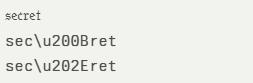
For example, the word “secret” can be obfuscated as:
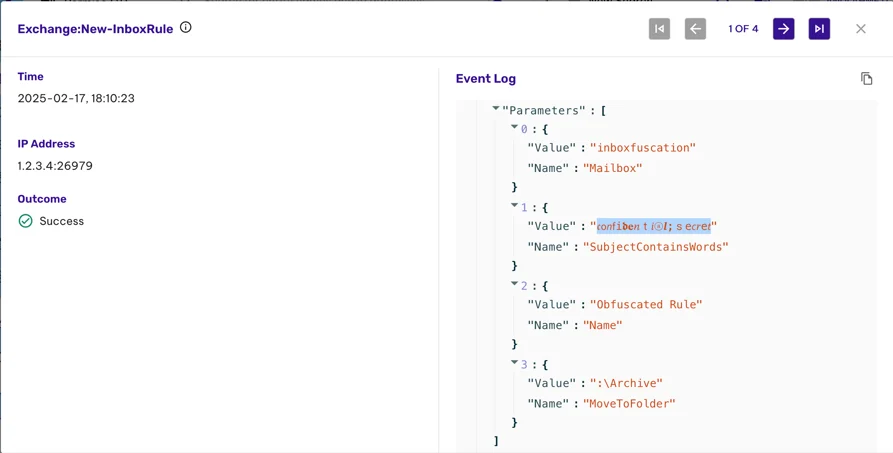
Permiso stated that by exploiting character categories such as MATHEMATICAL ALPHANUMERIC SYMBOLS (U+1D4B6), ZERO-WIDTH SPACES (U+200B), and RIGHT-TO-LEFT OVERRIDE (U+202E), attackers can create rules that appear benign in Exchange’s Get-InboxRule output yet functionally match sensitive keywords.
Exchange’s Get-InboxRule
Inboxfuscation also introduces functional obfuscation tricks, such as rules that forward emails into the Calendar folder or insert null characters (\u0000) to render rules invisible and unretrievable.
Detection and Mitigation Strategies
Conventional detection tools fail against Unicode obfuscation because they assume ASCII-based pattern matching and visual similarity.
Inboxfuscation’s detection framework extends Permiso’s Arbiter Detection module to analyze events across mailboxes and reconstruct multi-step rule creation behaviors. Key components include:
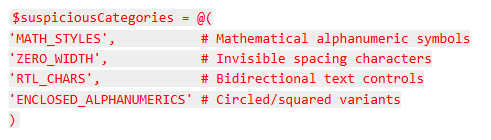
Character Category Analysis
Multi-Format Log Parsing
Supports JSON, CSV, Exchange export, and Microsoft 365 Graph API logs.
Rule Audit and Historical Analysis
SIEM Integration
Structured output includes rule_name, mailbox, risk_score, and unicode_char_count.
To mitigate this threat, security teams should implement Unicode-aware detection rules, perform comprehensive inbox rule audits, and simulate obfuscated rules in testing environments.
Organizations must update Exchange monitoring pipelines to flag suspicious Unicode categories and leverage sandboxed environments to inspect rule normalization behaviors.
Although these Unicode obfuscation techniques have not yet been observed in live attacks, their technical feasibility exposes a critical blind spot in email security postures.
By proactively adopting Inboxfuscation’s detection framework and understanding the mechanics of Unicode-based evasion, defenders can stay ahead of emerging APT tactics and protect enterprise communications from stealthy persistence techniques.
Google Chrome’s V8 JavaScript engine has been compromised by a critical type confusion zero-day vulnerability, designated CVE-2025-10585, marking the sixth actively exploited Chrome zero-day discovered in 2025.
This high-severity flaw, with an estimated CVSS 3.1 score of 8.8, enables remote code execution through sophisticated memory corruption techniques that bypass Chrome’s sandbox protections.
The vulnerability exploits Chrome’s V8 JavaScript engine through a type confusion attack that manipulates the TurboFan just-in-time compiler’s optimization assumptions.
Security researchers have confirmed active exploitation campaigns targeting cryptocurrency wallets and conducting espionage operations, with threat actors leveraging the flaw to execute arbitrary shellcode and escape Chrome’s renderer process sandbox.
V8 Type Confusion Mechanism
Type confusion vulnerabilities in V8 represent one of the most sophisticated attack vectors against modern browsers.
The CVE-2025-10585 flaw exploits Chrome’s performance optimization systems by corrupting the inline cache (IC) mechanism during JavaScript object property access.
NullSecurityX stated that the vulnerability manifests when malicious JavaScript code creates specially crafted Proxy objects that deceive V8’s type inference system.
During TurboFan compilation, the engine makes critical assumptions about object types based on runtime feedback.
Attackers can subvert these assumptions by implementing custom getter functions that return unexpected data types, causing the compiler to generate incorrect memory access patterns.
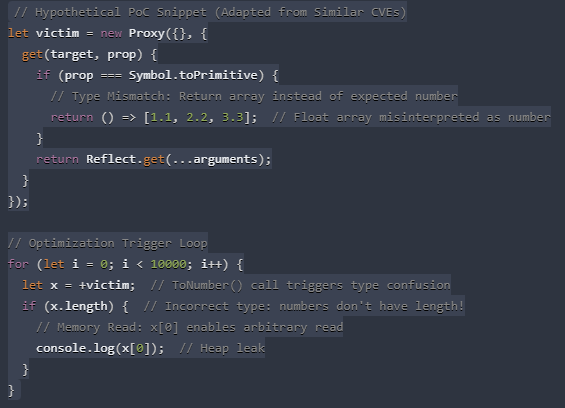
The technical exploitation chain begins with creating a JavaScript object containing a Symbol.toPrimitive handler that returns an array when V8 expects a primitive number.
When the ToNumber() conversion operation is invoked repeatedly (typically through arithmetic operations), V8’s Maglev and TurboFan compilers optimize the code path based on incorrect type assumptions.
This code demonstrates how attackers can manipulate V8’s type system to achieve memory corruption.
The vulnerability allows construction of “addrof” and “fakeobj” primitives, essential building blocks for advanced exploitation techniques including return-oriented programming (ROP) chain construction.
User visits a malicious web page JavaScript enabled, JIT optimizations active
CVSS 3.1 Score
8.8 (High)
Exploitation Impact
The attack chain typically begins with social engineering techniques, directing victims to malicious websites containing the exploitation code.
Threat intelligence reports indicate sophisticated actors are chaining this vulnerability with privilege escalation exploits to install persistent malware, steal cryptocurrency private keys, and conduct targeted surveillance operations.
The vulnerability’s network-based attack vector requires only that users visit a compromised website, making it particularly dangerous for widespread exploitation.
Google’s Threat Analysis Group has attributed some exploitation activities to commercial spyware vendors and nation-state actors, highlighting the vulnerability’s strategic value for intelligence operations.
The flaw enables attackers to bypass Chrome’s multi-process architecture and site isolation features, traditionally considered robust defensive mechanisms.
Cryptocurrency security firms have reported wallet drainage attacks specifically targeting Chrome users, with stolen funds traced to addresses associated with known cybercriminal organizations.
These attacks demonstrate the practical financial impact of the vulnerability beyond traditional espionage applications.
The vulnerability affects all Chrome versions prior to 140.0.7339.185 across Windows, macOS, and Linux platforms, as well as Chromium-based browsers, including Microsoft Edge, Brave, and Opera.
Google has released emergency patches addressing the flaw, with automatic updates already deployed to most Chrome installations worldwide.
Organizations should monitor network traffic for suspicious patterns associated with type confusion exploitation techniques and implement application whitelisting where feasible.
Advanced persistent threat actors increasingly target Microsoft Exchange inbox rules to maintain persistence and siphon sensitive data without raising alarms. The newly released Inboxfuscation tool delivers a Unicode-based obfuscation framework capable of generating malicious inbox rules that slip past conventional monitoring solutions. By exploiting Exchange’s handling of diverse Unicode character sets, Inboxfuscation crafts visually deceptive […]
The security landscape now moves at a pace no patch cycle can match. Attackers aren’t waiting for quarterly updates or monthly fixes—they adapt within hours, blending fresh techniques with old, forgotten flaws to create new openings. A vulnerability closed yesterday can become the blueprint for tomorrow’s breach.
This week’s recap explores the trends driving that constant churn: how threat
Google Chrome’s V8 JavaScript engine has long balanced speed and security for billions of users worldwide. On September 16, 2025, Google’s Threat Analysis Group discovered a critical zero-day flaw in the TurboFan compiler component of V8. Now tracked as CVE-2025-10585, the vulnerability allows attackers to trigger a type confusion condition, corrupt memory in the browser […]


 Yes
Yes.webp)


.webp)
.webp)
.webp)
.webp)
.webp)
.webp)
.webp)