Criminal IP, the AI-powered threat intelligence and attack surface management (ASM) platform developed by AI SPERA, announced its official entry into the European market through a strategic partnership with DotForce, a premier cybersecurity distributor based in Italy. The collaboration will extend Criminal IP’s advanced capabilities to enterprises and public institutions across Southern Europe, including Spain […]
Microsoft is issuing a direct call to its hardware partners, urging original equipment manufacturers (OEMs) to address configuration issues that prevent crucial USB-C troubleshooting notifications from functioning correctly in Windows 11.
These built-in alerts are designed to enhance user experience by identifying and helping to resolve common problems such as slow charging, faulty connections, and the use of unsupported accessories.
While Windows 11 includes a robust system for notifying users of USB-C port issues, the feature’s effectiveness is entirely dependent on how manufacturers configure their hardware.
According to a recent technical update, if users aren’t seeing these helpful alerts, the problem likely stems from incorrect platform settings implemented by the OEM, not a flaw within the Windows operating system itself.
The core of the issue lies in the Advanced Configuration and Power Interface (ACPI) specification, a markup that enables the operating system to communicate with and manage hardware components.
Microsoft has identified several common errors in how OEMs are implementing this. These include missing or incorrect ACPI descriptors that fail to properly identify USB-C ports, mislabeling port types (such as identifying a standard USB-A port as Type-C), and confusing internal ports with externally accessible ones, which can suppress necessary notifications.
To resolve these inconsistencies, Microsoft has laid out a clear set of validation and testing protocols for manufacturers. OEMs are being directed to use the Windows Hardware Lab Kit (HLK) to validate their USB port descriptors and ensure that specific ACPI methods, namely _UPC (USB Port Capabilities) and _PLD (Physical Location of Device), are implemented correctly.
The company is also advising partners to conduct rigorous testing with a variety of charging scenarios, including underpowered chargers and hubs, to confirm that notifications appear as expected for the end-user.
Microsoft also addressed security considerations, acknowledging that some OEMs may disable data transfer over USB-C in certain environments.
In such cases, the company recommends that the policy should only apply to externally accessible ports and that manufacturers should consider providing users with a toggle to enable or disable data transfer themselves.
The message to manufacturers is clear: audit all USB port configurations, validate notification behaviors across all supported devices, and coordinate with the Microsoft Windows Hardware Compatibility Program (WHCP) to ensure new platforms meet the required standards.
By taking these steps, OEMs can ensure their customers receive the seamless and reliable device experience that Windows 11 aims to provide.
Find this Story Interesting! Follow us on Google News, LinkedIn, and X to Get More Instant Updates.
In a significant security move, Microsoft announced on August 26, 2025, that it will require mandatory multifactor authentication (MFA) for all accounts signing in to the Azure portal and related administrative centers.
The policy, first introduced in 2024, aims to dramatically reduce account compromise by enforcing an additional layer of identity verification across Azure and Microsoft 365 admin portals.
Starting October 2024, sign-ins to the Azure portal, Microsoft Entra admin center, and Microsoft Intune admin center will require MFA for any create, read, update, or delete operation. Full enforcement across CLI, PowerShell, mobile, and IaC tools follows on October 1, 2025, significantly strengthening administrative security.
Microsoft research shows that enabling MFA blocks over 99.2 percent of account compromise attacks, making it one of the most effective defenses against unauthorized access.
Having offered optional MFA for years, Microsoft will now enforce it by default for critical administrative access points. The announcement underscores the company’s commitment to safeguarding cloud resources for its customers.
Scope of Enforcement
Enforcement is rolling out in two phases:
Phase 1 (October 2024 – February 2025)
Azure portal sign-in for all CRUD operations.
Microsoft Entra admin center sign-in for all CRUD operations.
Microsoft Intune admin center sign-in for all CRUD operations.
Microsoft 365 admin center sign-in requirements begin in February 2025.
Phase 1 does not yet cover Azure CLI, Azure PowerShell, Azure mobile app, Infrastructure as Code (IaC) tools, or REST API endpoints.
Phase 2 (October 1, 2025)
Azure CLI and Azure PowerShell for create, update, and delete operations.
Azure mobile app for create, update, and delete operations.
IaC tools and REST API endpoints for create, update, and delete operations.
Read-only operations remain exempt.
Administrators relying on user accounts for scripted automation should transition to workload identities, such as managed identities or service principals, to avoid disruption when Phase 2 enforcement begins, Microsoft said.
Affected Applications and Timelines
Application Name
Enforcement Start
Azure portal
Second half of 2024
Microsoft Entra admin center
Second half of 2024
Microsoft Intune admin center
Second half of 2024
Microsoft 365 admin center
February 2025
Azure CLI & PowerShell
October 1, 2025
Azure mobile app
October 1, 2025
IaC tools & REST API
October 1, 2025
All user accounts accessing the applications listed above must complete MFA upon enforcement. Break-glass and emergency-access accounts also require MFA; organizations are encouraged to configure passkeys (FIDO2) or certificate-based authentication for these critical accounts. Workload identities remain unaffected, but any user-based service accounts must comply.
The OAuth 2.0 Resource Owner Password Credentials (ROPC) flow is incompatible with MFA. Applications using MSAL’s ROPC APIs must migrate to interactive or certificate-based flows.
Developers should update any code that relies on AcquireTokenByUsernamePassword or UsernamePasswordCredential in Azure Identity, following Microsoft’s migration guides for .NET, Go, Java, Node.js, and Python.
Organizations can prepare by:
Verifying MFA configuration via the Microsoft Entra ID portal.
Applying or updating Conditional Access policies (requires Entra ID P1/P2).
Enabling security defaults if Conditional Access is unavailable.
Migrating user-based service accounts to workload identities.
Tenants needing more time may postpone Phase 1 enforcement until September 30, 2025, by having a Global Administrator select a new start date at https://aka.ms/managemfaforazure. Similarly, Phase 2 can be deferred until July 1, 2026, via https://aka.ms/postponePhase2MFA.
After enforcement, Azure portal banners will notify administrators of required MFA, and sign-in logs will identify MFA challenges. Microsoft strongly recommends immediate MFA adoption to secure high-value administrative accounts and mitigate the growing threat of credential-based attacks.
Find this Story Interesting! Follow us on Google News, LinkedIn, and X to Get More Instant Updates.
A newly discovered critical security vulnerability in the Next.js framework, designated CVE-2025-29927, poses a significant threat to web applications by allowing malicious actors to completely bypass authorization mechanisms.
This vulnerability arises from improper handling of the x-middleware-subrequest header within Next.js middleware execution, potentially exposing sensitive administrative areas and protected resources to unauthorized access.
The vulnerability affects multiple versions of the popular React-based web framework, with different exploitation techniques depending on the specific version in use.
Key Takeaways
1. CVE-2025-29927 exploits x-middleware-subrequest to bypass Next.js authorization.
2. Attackers set the header to middleware names to skip checks.
3. Grants unauthorized access, so implement layered security.
Security researchers have demonstrated that attackers can manipulate HTTP headers to circumvent authentication and authorization controls, gaining access to restricted areas without proper credentials.
Next.js Framework Vulnerability
NullSecurityX reports that the core of this vulnerability lies in Next.js’s middleware processing logic, specifically how it handles the x-middleware-subrequest header.
This header was originally designed to prevent infinite middleware loops by identifying internal subrequests. However, flawed implementation allows external requests to abuse this mechanism.
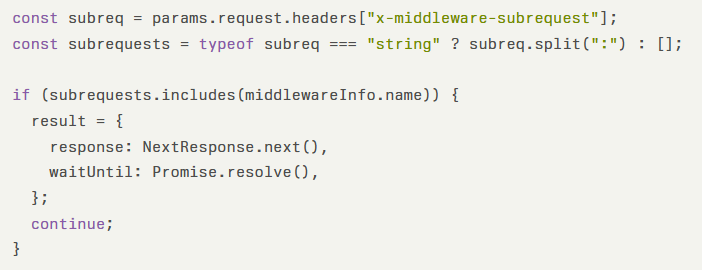
The vulnerable code pattern follows this structure:
When an attacker includes the appropriate x-middleware-subrequest header value in their HTTP request, the middleware incorrectly identifies it as an internal subrequest and skips authorization checks entirely. The exploitation varies across Next.js versions:
Version 12.2 and Earlier: Attackers use x-middleware-subrequest: pages/_middleware to bypass middleware located in the pages directory.
Version 12.2 and Later: The header value changes to x-middleware-subrequest: middleware for middleware files named middleware.ts.
Version 13.2.0 and Later: Despite recursion depth protections, the fundamental vulnerability persists through repeated middleware names in the header.
Practical exploitation scenarios demonstrate the severity of this vulnerability. Attackers can craft simple HTTP requests to access protected administrative panels.
This request bypasses middleware protection and grants unauthorized access to admin functionality.
The vulnerability becomes particularly dangerous when combined with JSON Web Token (JWT) or cookie-based authentication systems, where the header manipulation allows complete circumvention of token validation.
Automated exploitation tools can systematically test multiple protected routes simultaneously.
Ability to craft HTTP requests with custom x-middleware-subrequest header
CVSS 3.1 Score
9.8 (Critical)
Security researchers have developed proof-of-concept scripts that iterate through common administrative endpoints (/admin, /dashboard, /settings) while injecting the malicious header, quickly identifying vulnerable access points across entire applications.
The vulnerability’s impact extends beyond simple authorization bypass. In applications that rely solely on Next.js middleware for security controls, attackers can potentially access sensitive user data, modify application configurations, or execute administrative functions without proper authentication.
Organizations running Next.js applications should immediately assess their middleware implementations and apply available security patches.
This discovery highlights the critical importance of defense-in-depth security strategies, where authorization controls exist at multiple application layers rather than relying solely on middleware-based protection mechanisms.
Find this Story Interesting! Follow us on Google News, LinkedIn, and X to Get More Instant Updates.
A novel phishing campaign emerged in late August 2025 that specifically targeted hoteliers and vacation rental managers through malicious search engine advertisements.
Rather than relying on mass email blasts or social media lures, attackers purchased sponsored ads on platforms such as Google Search, typosquatting legitimate service providers’ names to redirect unsuspecting users.
By mimicking brands like SiteMinder and RoomRaccoon, the adversaries ensured that their malicious domains appeared above authentic listings, dramatically increasing the likelihood of victim engagement.
Example of malvertising showing two fake websites promoted above a legitimate domain (Source – okta Security)
Once a victim clicked on a sponsored link, they were presented with highly convincing fake login portals.
These pages replicated the exact look and feel of established property management and guest messaging platforms, complete with corporate logos, form fields for usernames, passwords, and even multi-factor authentication prompts.
The attackers went so far as to implement social engineering techniques that coaxed users into divulging one-time passwords sent via SMS or email.
By harvesting not only static credentials but dynamic OTP codes, the campaign was engineered for maximal account takeover potential.
okta Security analysts identified this campaign after observing a sudden spike in outbound traffic from a large Russian datacenter proxy provider to multiple hospitality domains.
Analysis of phishing page source code revealed Russian-language comments and error messages such as “Ошибка запроса” (“Request error”), indicating possible ties to Russian-speaking threat actors.
Moreover, the phishing sites employed JavaScript beaconing scripts to track visitor interactions in real time, collecting geolocation data, session duration, and bot-detection metrics.
Beyond the initial credential harvesting phase, the attackers demonstrated sophisticated persistence tactics. By integrating beaconing functions, they were able to monitor whether victims entered correct credentials and OTPs. A simplified version of their JavaScript beaconing mechanism appears below:
function sendRequest() {
    fetch("/mksd95jld43").catch(error => console.error("Ошибка запроса"));
}
// Запускаем запрос каждые 10 секунд
setInterval(sendRequest, 10000);
Phishing pages (Source – okta Security)
This looped request every ten seconds, ensuring continuous data exfiltration whenever victims interacted with the phishing pages.
Infection Mechanism
Delving deeper into the infection mechanism, the campaign’s reliance on malvertising sets it apart from traditional phishing operations.
Rather than exploiting browser vulnerabilities directly, the attackers weaponized search engine advertising to poison the user’s journey from the outset.
By bidding on high-value keywords—often the exact names of hospitality platforms—the malicious ads appeared alongside or above genuine results.
Victims searching for “SiteMinder login” or “RoomRaccoon channel manager” would instead encounter URLs like siteminder.live and rocmracooon.cfd, both of which were visually indistinguishable from legitimate domains.
Example of malvertising directing users to another phishing site (Source – okta Security)
Upon landing, the phishing pages initiated the JavaScript beacon to confirm victim presence and to capture responses to form fields.
The code forced periodic outbound connections to command-and-control endpoints, ensuring that credentials and OTPs were relayed immediately.
In addition, the attackers engineered the login forms to accept multiple MFA methods—SMS, email, and authenticator apps—thereby maximizing their chances of bypassing any single factor of defense.
Detection of this infection mechanism requires vigilant monitoring of ad campaigns and domain registrations.
Organizations should implement adaptive risk assessments to flag sudden requests from unfamiliar networks and promptly investigate any deviations from normal user activity.
By combining threat intelligence with real-time monitoring of ad ecosystems, defenders can disrupt this sophisticated malvertising-driven phishing strategy before it compromises critical hotel management infrastructure.
Boost your SOC and help your team protect your business with free top-notch threat intelligence: Request TI Lookup Premium Trial.
MediaTek today published a critical security bulletin addressing several vulnerabilities across its latest modem chipsets, urging device OEMs to deploy updates immediately.
The bulletin, issued two months after confidential OEM notification, confirms that no known in-the-wild exploits have been detected to date.
Key Takeaways
1. MediaTek patched high- and medium-severity modem and firmware bugs across 60+ chipsets.
2. OEMs received fixes in July; update Modem NR and BSP now.
3. No exploitation detected.
High-Severity Out-of-Bounds Flaws
Three high-severity Common Vulnerability Scoring System version 3.1 (CVSS v3.1)–rated flaws affect the Modem firmware on dozens of MediaTek chipsets.
CVE-2025-20708: An out-of-bounds write (CWE-787) in the Modem’s buffer‐validation logic permits remote privilege escalation when a user equipment (UE) connects to a rogue base station.
No user interaction is required to trigger the vulnerability. Affected chipsets include MT6813, MT6833, MT6855, MT8873, MT8893, and over 60 more models running Modem NR15–NR17R software versions.
CVE-2025-20703: An out-of-bounds read (CWE-125) in the same Modem component allows remote denial-of-service under similar conditions and with no user interaction.
Impacted silicon spans MT2735, MT6789, MT6893, MT8678, MT8791T, MT8883, among others, all on NR15–NR17R releases.
CVE-2025-20704: A second out-of-bounds write (CWE-787) stemming from a missing bounds check can also yield remote privilege escalation, though user interaction is required for exploitation.
The flaw targets a subset of chipsets—MT6835T, MT6899, MT6991, MT8676, MT8792, and a dozen more—running Modem NR17 and NR17R builds.
Medium-Severity Memory Corruption Flaws
Three medium-severity use-after-free bugs (CWE-416) reside in the monitor_hang, mbrain, and geniezone modules of the chipset firmware:
CVE-2025-20705 (“monitor_hang uaf”): A use-after-free error could enable local privilege escalation for attackers who already possess System privileges.
A broad range of chipsets from MT2718 to MT8796 across Android 13–16, OpenWRT 19.07/21.02, and Yocto 2.6 releases are affected.
CVE-2025-20706 (“mbrain uaf”): Similar memory corruption in the mbrain task scheduler on MT6899, MT6989, MT6991, MT8676, and MT8678 running Android 14–15 may lead to local code execution.
CVE-2025-20707 (“geniezone uaf”): A flaw in the geniezone service can result in memory corruption under local privilege conditions on MT2718, MT6853, MT8792, MT8883, and other models across Android 13–15.
CVE
Title
Severity
CVE-2025-20708
Out-of-bounds write in Modem
High
CVE-2025-20703
Out-of-bounds read in Modem
High
CVE-2025-20704
Out-of-bounds write in Modem
High
CVE-2025-20705
Use after free in monitor_hang
Medium
CVE-2025-20706
Use after free in mbrain
Medium
CVE-2025-20707
Use after free in geniezone
Medium
All vulnerabilities were discovered via external security research, except CVE-2025-20704, which was identified by internal validation teams.
OEM partners have received patches since July, and final firmware images incorporating these fixes will begin rolling out immediately.
MediaTek reminds integrators to upgrade Modem NR and Android BSP versions to mitigate risks.
Find this Story Interesting! Follow us on Google News, LinkedIn, and X to Get More Instant Updates.
A startling vulnerability in Pudu Robotics’ management APIs that allowed anyone with minimal technical skill to seize control of the company’s food delivery and service robots. The vulnerability, which went unaddressed for weeks despite repeated responsible‐disclosure attempts, could have enabled malicious actors to redirect BellaBots and other Pudu models to deliver meals to unintended recipients, […]
Salesforce today unveiled its comprehensive Forensic Investigation Guide, equipping organizations with best practices, log analysis techniques, and automation workflows to detect and respond to sophisticated security breaches rapidly.
To reconstruct attack timelines and assess data exposure, the guide emphasizes three primary information sources: Activity Logs, User Permissions, and Backup Data.
Key Takeaways
1. Salesforce’s new Forensic Investigation Guide outlines how to leverage Holistic log and backup use for incident reconstruction.
2. Granular API event details to pinpoint data exfiltration.
3. Real-time security policies for automated threat containment.
Administrators should enable Shield Event Monitoring for real-time visibility into API calls, report exports, and file downloads.
The guide highlights three Event Monitoring sources:
Real Time Event Monitoring (RTEM) – streams threat detection alerts using statistical and machine learning methods to flag anomalies
Event Log Objects (ELO) – delivers low-latency records via Platform APIs for near real-time queries
Event Log Files (ELF) – provides comprehensive logs in CSV format for historic analysis
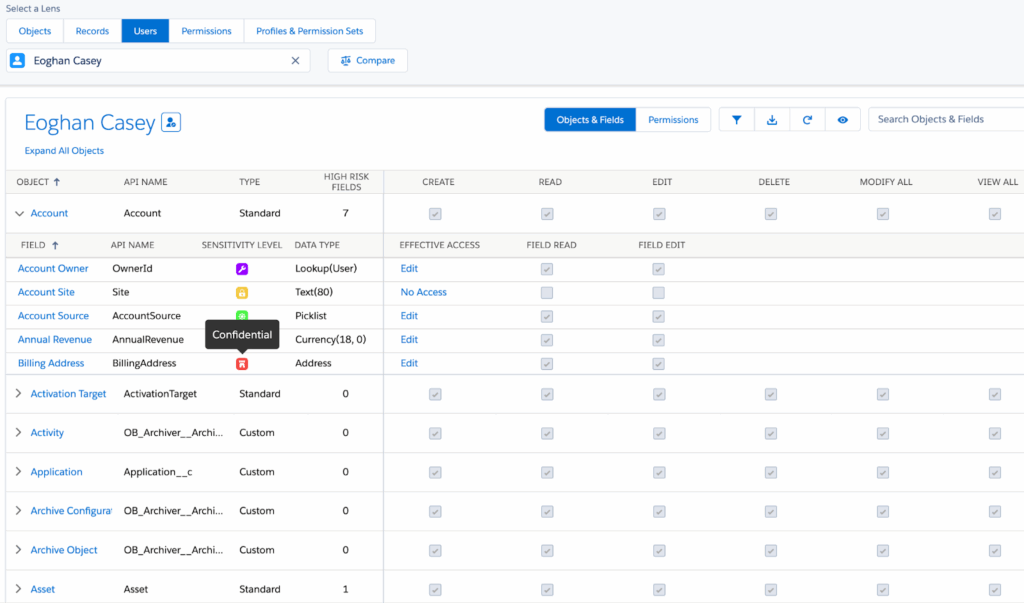
WsW Explorer: Visualizing User Access
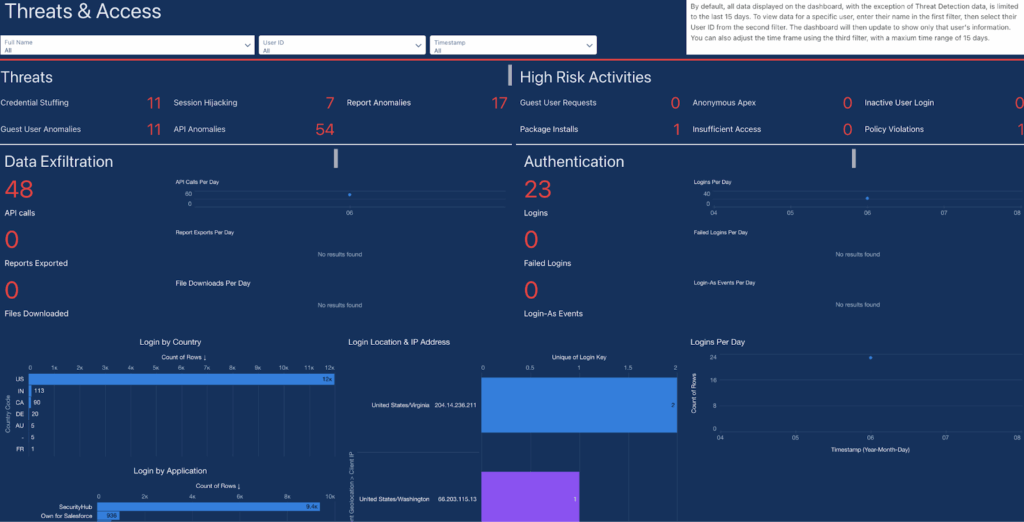
By comparing ELF.ReportExport, ELO.ReportEventLog, and RTEM.ReportEventStream fields, investigators can pinpoint exactly which records and fields were accessed, with RTEM providing the most detailed context on queried entities and session parameters.
Threats & Access dashboards
Automated Response with Transaction Security Policies
The guide also details how to leverage Enhanced Transaction Security Policies (TSP) to enact real-time countermeasures.
Transaction Security Policies
Security teams can define policy rules to automatically block sensitive report downloads, trigger multi-factor authentication challenges, or create incident cases via workflow. For example, a Guest User Anomaly alert on a Digital Experience portal can activate a TSP that:
Blocks unauthorized AuraRequest events
Sends an immediate Slack notification
Requires MFA for any subsequent data access
Such automation ensures that suspicious actions like abnormal API volumes or unexpected file exports are halted before data exfiltration can escalate.
Organizations following the principle of least privilege across Profiles, Permission Sets, Sharing Rules, and Role Hierarchies will find forensic readiness significantly enhanced.
The guide recommends regular comparative analysis of backup snapshots using Backup & Recover, and continuous log streaming to centralized SIEM platforms for early anomaly detection.
With the Salesforce Forensic Investigation Guide, enterprises are now armed to accelerate root-cause analysis, minimize downtime, and uphold data integrity in the face of evolving cloud-native threats.
Find this Story Interesting! Follow us on Google News, LinkedIn, and X to Get More Instant Updates.
In a significant security move, Microsoft announced on August 26, 2025, that it will require mandatory multifactor authentication (MFA) for all accounts signing in to the Azure portal and related administrative centers. The policy, first introduced in 2024, aims to dramatically reduce account compromise by enforcing an additional layer of identity verification across Azure and […]
macOS has long been recognized for its robust, integrated security stack, but cybercriminals are finding ways to weaponize these very defenses.
Recent incidents show attackers exploit Keychain, SIP, TCC, Gatekeeper, File Quarantine, XProtect, and XProtect Remediator to stealthily deliver malicious payloads.
Key Takeaways
1. Abuse of macOS tools (Keychain, SIP, File Quarantine) for credential theft and evasion.
2. Defense-evasion via disabling Gatekeeper, clickjacking TCC, and unloading XProtect.
3. ESF logging with Sigma rules plus third-party EDR ensures detection.
Exploiting Built-in macOS Protection
Kaspersky reports that attackers have shifted from blunt-force exploits to nuanced abuse of legitimate tools and features. One common vector involves Keychain: adversaries use utilities like or the native /usr/bin/security list-keychains and security dump-keychain commands to harvest credentials.
To detect such unauthorized usage, organizations must log process-creation events via ESF and flag invocations where cmdline matches security with -list-keychains or -dump-keychain.
A representative Sigma rule triggers on these patterns under attack.credential-access (T1555.001).
System Integrity Protection (SIP) is another focus. Attackers boot into Recovery Mode to execute but they often probe SIP status first using csrutil status.
Since Recovery Mode executions elude standard logs, defenders should implement continuous SIP status monitoring and generate alerts on state changes an approach aligned with Sigma rule T1518.001 under attack.discovery.
Weaponizing File Quarantine, Gatekeeper, and TCC
File Quarantine, which tags downloaded executables with the com.apple.quarantine attribute, can be bypassed by low-level tools such as curl or wget, or by invoking
Monitoring for xattr executions with -d com.apple.quarantine enables detection of quarantine-removal attempts (Sigma T1553.001 under attack.defense-evasion).
Gatekeeper relies on code-signing and the spctl utility. Attackers may disable it or trick users into right-clicking an app to bypass signature checks, Kaspersky said.
Alerting on spctl with –master-disable or –global-disable parameters uncovers these defense-evasion tactics (Sigma T1562.001).
Transparency, Consent, and Control (TCC) governs access to the camera, microphone, and Full Disk Access through the SQLite-based TCC.db.
While modification requires disabling SIP or hijacking a system process, adversaries employ clickjacking overlays to trick users into granting elevated permissions. Continuous auditing of TCC.db changes and user prompts is crucial for early warning.
Finally, XProtect and XProtect Remediator offer signature-based malware blocking and automatic remediation.
Sophisticated attackers attempt to disable or bypass these services by injecting unsigned kernel extensions (kexts) or abusing launchctl to unload Apple’s daemons. Defenders must track launchctl unload and unsigned-kext load attempts.
Although macOS’s integrated security layers are formidable, attackers continuously evolve to exploit legitimate mechanisms.
Implementing detailed ESF-based logging, deploying Sigma rules for critical command patterns, and augmenting native defenses with third-party EDR solutions can effectively detect and thwart these advanced threats.
Find this Story Interesting! Follow us on Google News, LinkedIn, and X to Get More Instant Updates.


.webp)
.webp)
.webp)